


BenchPrep allows administrators to manage completed exam results directly from Console, including printing detailed exam reports, sending reports to designated recipients, and releasing restricted results to learners.
These capabilities give organizations greater control over how and when exam results are shared. For example:
- Certification and assessment programs may need to review or verify exam results before making them available to learners.
- Cohort-based programs may prefer to release results at a coordinated time rather than immediately after each learner completes an exam.
- Instructor-led programs may want to review exam performance with learners or share detailed reports before making results available in the Learning Application.
When used with Exam Results Restriction, administrators can keep exam results hidden from learners while still accessing, printing, or sending detailed reports through Console.
Considerations Before Enabling
Before enabling these capabilities, organizations should consider how PDF downloads, report sharing, and exam results visibility align with their content-sharing requirements.
- Tenant-Wide PDF Downloads: Print PDF is enabled by BenchPrep at the tenant level and applies to all courses within your organization. It cannot be limited to individual courses.
- Access to Exam and Practice Content: Enabling Print PDF also makes learner-facing PDF downloads available for exams, Category Practice, and Custom Practice. These downloads may include questions, correct answers, explanations, and other question-level details, including before a learner completes an exam.
- Administrator Access to Restricted Results: Administrators can print or email complete exam PDFs, including scores and answers, even when Exam Results Restriction is configured. Printing or sending these reports does not release results in the Learning Application, but recipients of emailed PDFs can access the results contained in the report.
- Download Exam & Practice Reports: This separate, course-level feature allows learners to download performance summaries. If enabled, scores from exams with restricted results can still appear in the downloadable Exam Reports Summary. Exam Results Restriction does not prevent these scores from appearing in the summary report. Learn more in Download Exam & Practice Reports.
We recommend testing these capabilities in your Staging environment before enabling them in Production to understand how PDF downloads, exam results restriction, and downloadable performance summaries behave together.
For more information about the content included in learner-facing PDFs, see Downloading and Printing Exam and Practice Questions.
Enabling the Functionality
The ability to print and send detailed exam reports requires the Print PDF functionality to be enabled by BenchPrep at the tenant level.
Exam Results Restriction is a separate feature that must be enabled by BenchPrep at both the tenant and course levels. Once enabled, administrators can configure results restriction for individual exams in BluePrint.
To request enablement, contact BenchPrep Support.
Configuring Exam Results Restriction
Exam Results Restriction allows organizations to hide exam scores and detailed results from learners until an administrator releases them.
Step 1: Create a Custom Modal in Console
Before configuring an exam with restricted results, create a Custom Modal in Console.
This modal appears when a learner completes an exam with restricted results. Organizations can customize its content to explain why the results are unavailable and provide instructions for accessing them.
To create a modal, navigate to Console > Experience > Custom Modals and select New Modal.
For detailed instructions, see Configuring Custom Modals in Console.
Step 2: Configure Results Restriction in BluePrint
Once the Custom Modal has been created:
- Navigate to BluePrint and open the course containing the exam.
- Open the exam's configuration page.
- Locate the Results Restriction section.
- Select the Restricted checkbox.
- Under Test Results Restriction Modal, select the Custom Modal created in Step 1.
- Select Update to save the configuration.
- Build the course to publish the changes.
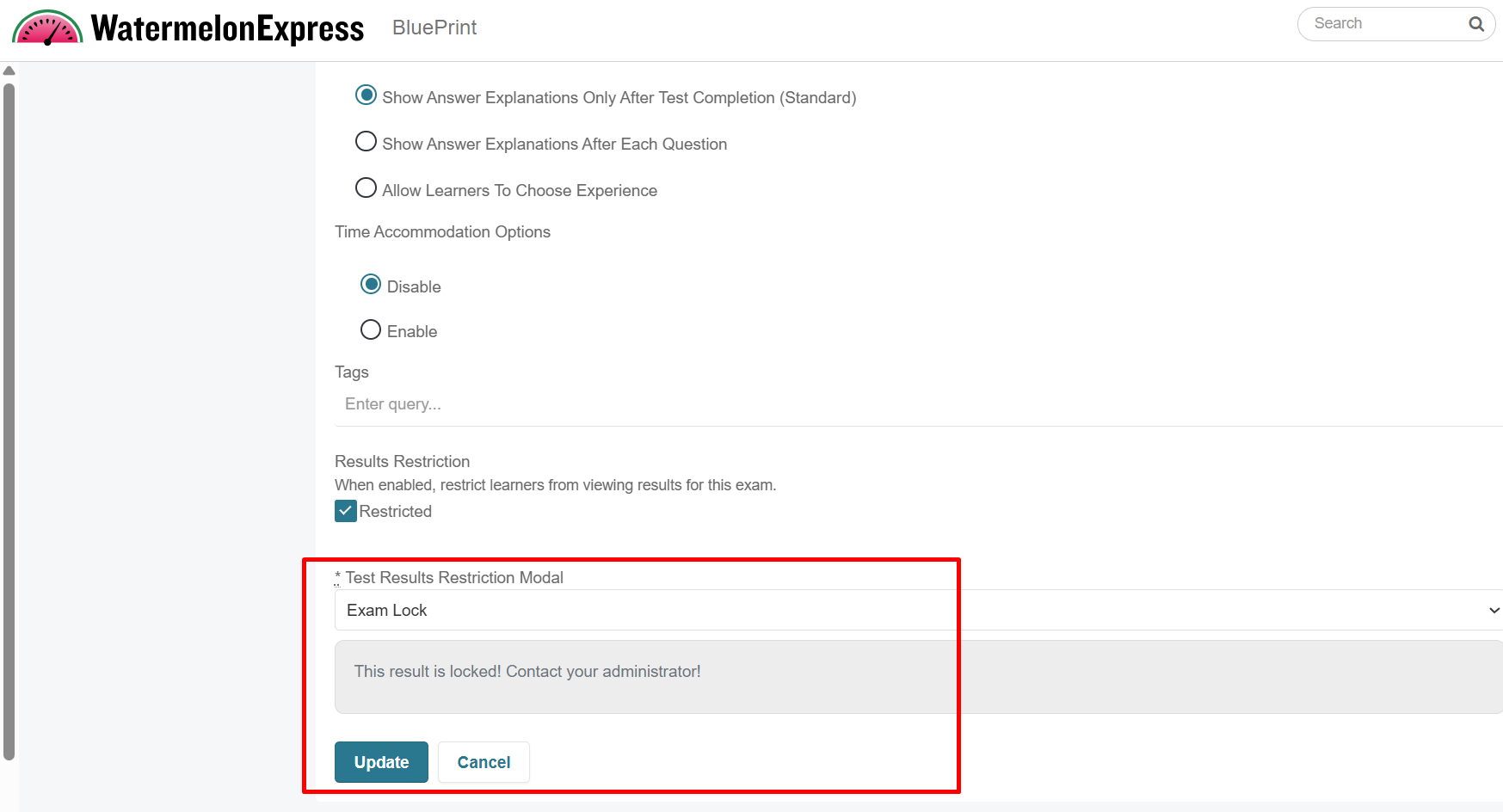
Once the course changes are published, results restriction will apply to the configured exam.
Learner Experience with Restricted Exam Results
When Exam Results Restriction is configured, learners can continue accessing and taking exams, but their scores remain hidden until an administrator releases them.
Viewing Restricted Results on the Tests Dashboard
When learners navigate to the Tests section of the Learning Application:
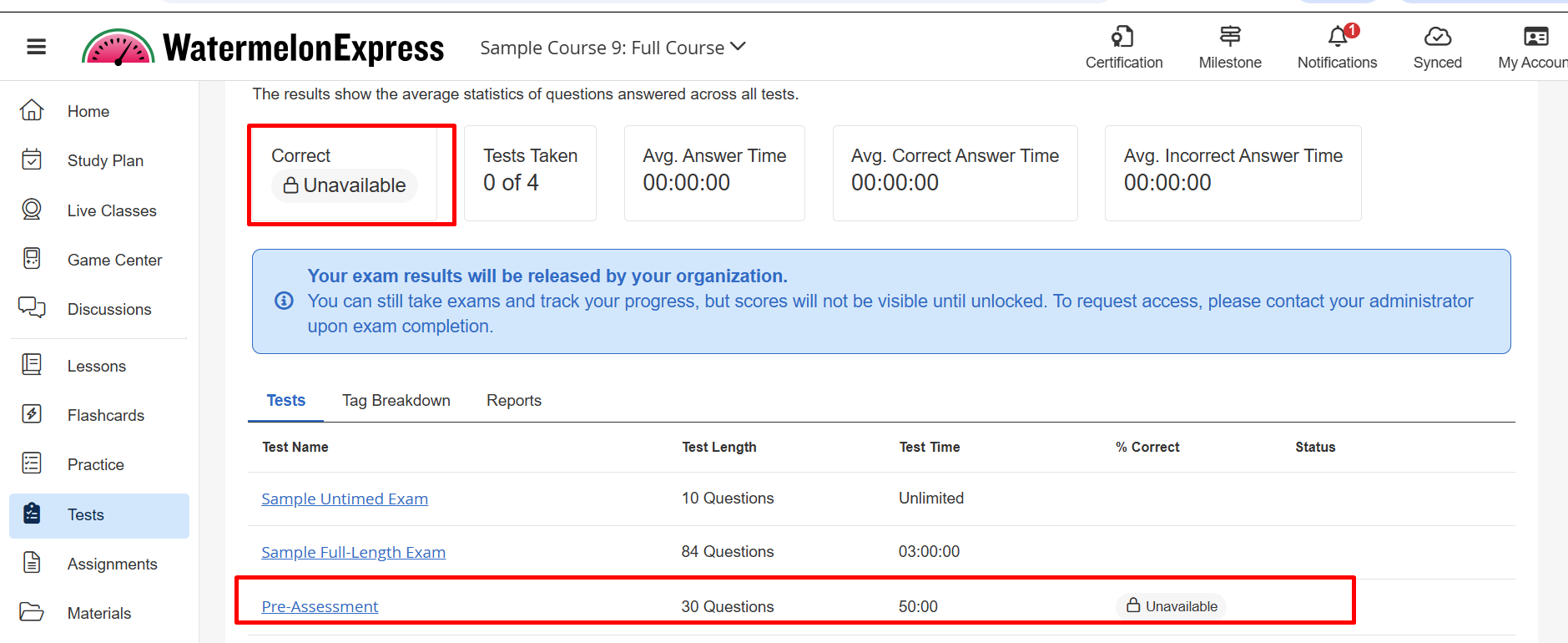
- Overall Results: The Correct statistic displays a lock icon and Unavailable when at least one exam has restricted results, even if other exams are not restricted.
- Individual Exam Results: Exams with restricted results display a lock icon and Unavailable in the % Correct column.
- Informational Message: A blue notification explains that exam results will be released by the organization and directs learners to contact their administrator for access.
Viewing Restricted Results on an Individual Exam
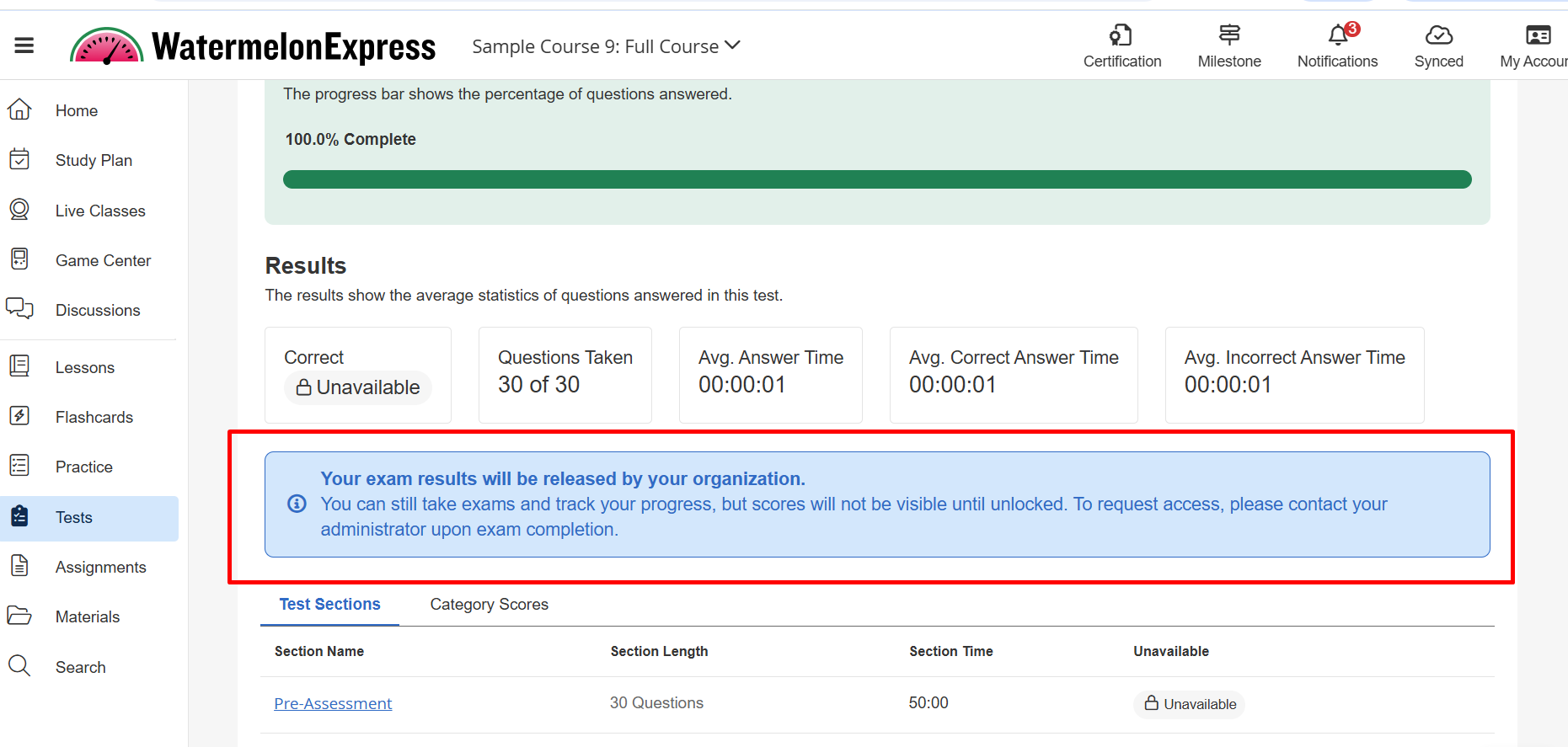
When learners open an exam configured with Exam Results Restriction, they can still access the exam details page and view available progress information, including questions taken and time statistics.
However, the Correct statistic displays a lock icon and Unavailable instead of a score. A blue informational message explains that the results will be released by the organization.
Learners can continue taking the exam, but their scores remain hidden until an administrator releases the results through Console.
After Completing an Exam with Restricted Results
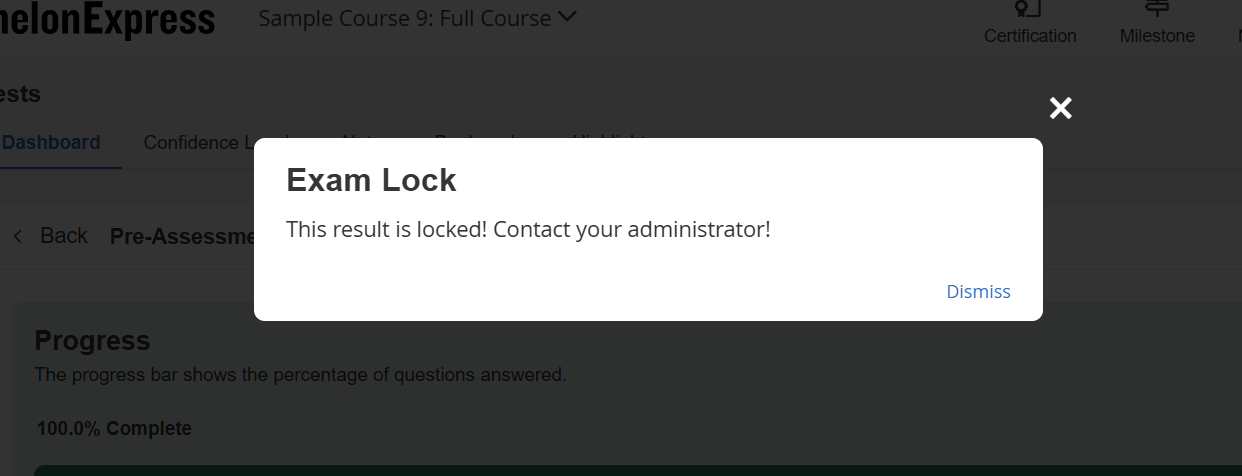
When a learner completes an exam with Exam Results Restriction enabled, the Custom Modal selected during configuration automatically appears.
The modal displays the message configured by the organization, which can explain why results are unavailable and provide instructions for accessing them.
Learners can dismiss the modal and return to their exam details page. Their results remain restricted until an administrator releases them through Console.
After Results Are Released
Once an administrator releases the results, learners can view their exam scores and access their detailed exam results in the Learning Application.
If PDF downloads are enabled, learners can also download their completed exam PDF.
Accessing Completed Exam Results in Console
Administrators can manage completed exam results from the learner's User Details page in Console.
- Navigate to Console and open the learner's User Details page.
- Select the Exam Results tab.
- Locate the completed exam.
- In the Actions column, select More to view the available options.
Depending on the configuration and permissions, administrators can select Print, Send Report, or Release.
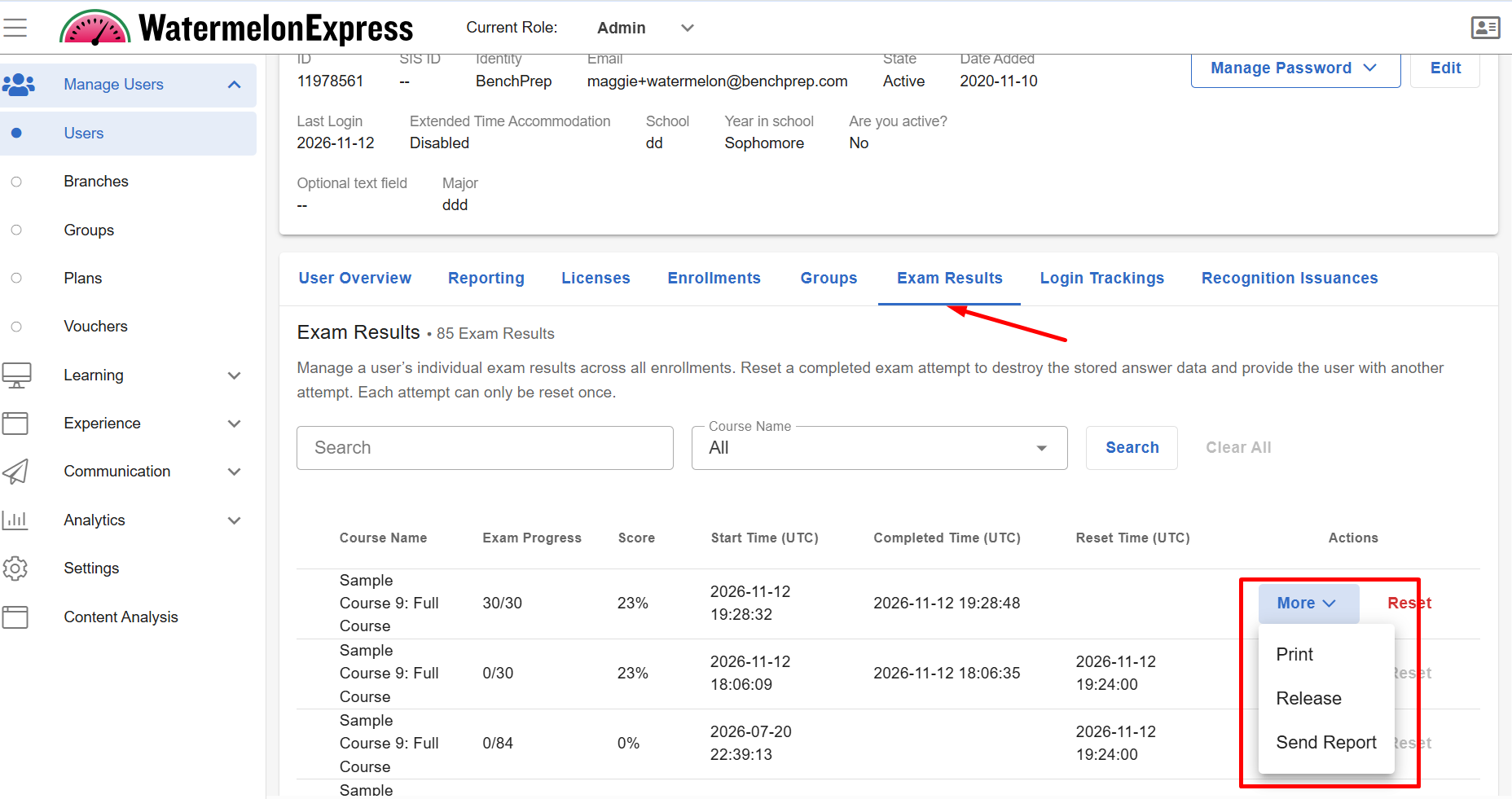
Printing Exam Results
The Print option allows administrators to generate a detailed PDF of a learner's completed exam directly from Console.
This is the same completed exam PDF generated through the Print PDF functionality. It includes the learner's overall score, questions, selected answers, correct answers, explanations, and available question-level details.
To print an exam report:
- Locate the completed exam under Exam Results.
- Select More, then Print.
- The PDF opens in the browser, where it can be viewed, saved, or printed.
Administrators can generate and view the complete PDF even when the exam results are restricted from the learner. Printing the report does not release the results or change their visibility in the Learning Application.
Sending Exam Results
The Send Report option allows administrators to email the same detailed exam PDF generated through the Print option to designated recipients.
The emailed PDF includes the learner's overall score, questions, selected answers, correct answers, explanations, and available question-level details. It is not a separate performance report.
To send an exam report:
- Locate the completed exam under Exam Results.
- Select More, then Send Report.
- Enter the recipient's email address in the window that appears.
- Submit the request to send the report.
The recipient receives an email containing the detailed completed exam PDF.
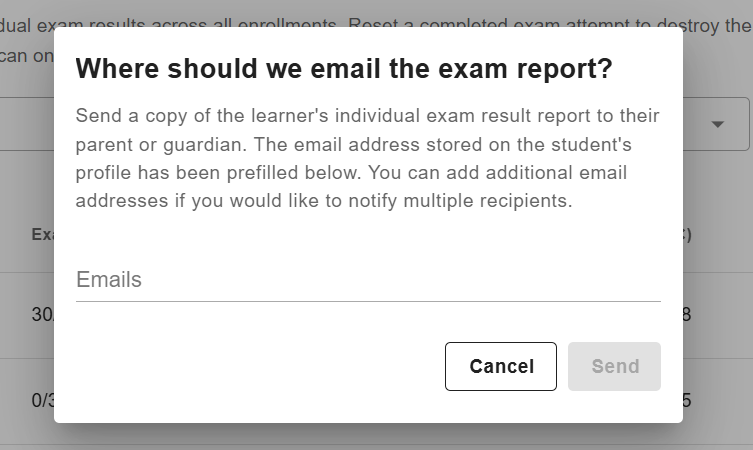
Important: Administrators can send the full exam PDF even when results remain restricted in the Learning Application. Recipients of the emailed PDF will have access to the learner's results, but sending the report does not automatically release those results in the Learning Application.
Releasing Exam Results to Learners
For organizations using Exam Results Restriction, administrators can release completed exam results when they are ready to make them available to learners.
Who Can Release Exam Results?
The following users can release exam results through Console:
- Users with an Admin role in Console.
- Users with a custom role that includes the release:exam_results permission.
The release:exam_results permission supports Tenant and Branch scopes, allowing organizations to grant result-release access according to their administrative structure.
How to Release Exam Results
- Navigate to Console and open the learner's User Details page.
- Select the Exam Results tab.
- Locate the completed exam with restricted results.
- Select Release to make the results available to the learner.
Once released, the learner can view their exam score and detailed results in the Learning Application.
Using Print, Send Report, and Release Together
These actions can be used together to support organizations that want to review or share exam results before making them available to learners.
For example, administrators can keep results restricted while reviewing a learner's completed exam, use Print to generate a PDF for internal review, or use Send Report to email the detailed exam PDF to a designated recipient.
When the organization is ready to make the results available in the Learning Application, an authorized administrator can select Release.
Note: Exam Results Restriction controls the visibility of results within the Learning Application. Printing or sending a completed exam PDF provides access to those results outside the Learning Application but does not release them to the learner. Results remain restricted until an authorized administrator releases them through Console.

