


In a typical classroom, an instructor or teacher may want to pull learners aside for a private conversation or invite learners to participate in a group discussion. The Private Discussions feature provides a similar experience within the learning application by allowing instructors, teachers, and learners to participate in closed discussion groups with selected users.
There are two separate feature accesses for Private Discussions:
- Private Discussions (created by admins/instructors): Controls private discussions created by users who have a custom role that includes the Create private discussions with learners permission, for example an instructor or teacher.
- Private Discussions (created by learners): Controls whether learners can create their own private discussion groups.
Configuring Private Discussions
Private Discussions are configured differently depending on whether discussions will be created by an instructor/teacher or by a learner.
Private Discussions created by admins/instructors
- The Private Discussions (created by admins/instructors) feature access is managed at the Tenant and Branch levels.
- By default, the feature is OFF at the Tenant level and ON at the Branch level.
- The feature must first be turned ON at the Tenant level.
- Once enabled for the Tenant, the feature is available across branches by default. If a specific Branch should not have access, the feature can be turned OFF for that Branch.
- A user creating the discussion must have a custom role that includes the Create private discussions with learners permission.
- The user must also have an active enrollment in the course where they are creating the private discussion.
Private Discussions created by learners
- The Private Discussions (created by learners) feature access is managed at the Tenant level only.
- This feature is ON by default.
- When enabled, learners can create their own private discussion groups across the Tenant.
- When turned OFF, learner-created private discussions are disabled across the entire Tenant.
Additional behavior:
- There is no limit to how many private discussions can be created.
- There is no limit to the number of users who can be included in a private discussion.
- Private discussions can only include users within the same Branch.
- Learners can participate in private discussions they have been invited to.
- Discussions submitted by learners that contain certain "trigger" words are automatically deleted. The learner receives a success message after submitting the discussion to discourage them from resubmitting the content. The applicable trigger words are maintained internally by BenchPrep and can be updated at the request of the client.
Starting a Private Discussion
An instructor or teacher can initiate a private discussion in a course when they have a custom role that includes the Create private discussions with learners permission and an active enrollment in the course.
To create a private discussion:
-
Open Discussions from the left-hand navigation bar.
-
Select Private.
-
Select Create Group.
-
Enter a group name and description, invite users to join, then select Save to send the invitations.

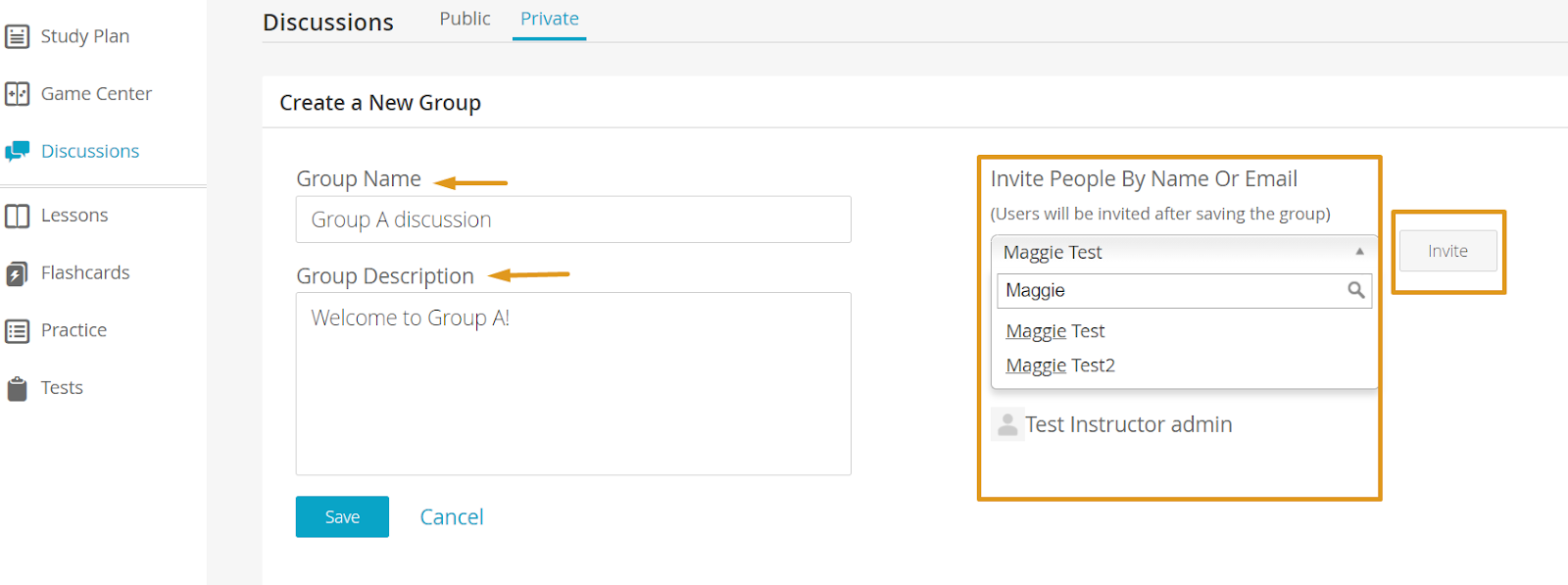
Invited users will receive a message in their Notifications Center informing them that they have been invited to the discussion. Selecting the notification will take them to the private discussion and allow them to join it.
The instructor or teacher who manages the private discussion can select Manage to update the group. From there, they can rename the group, change the description, and add or remove members.


