You are using an unsupported browser. Please update your browser to the latest version on or before July 31, 2020.
close
You are viewing the article in preview mode. It is not live at the moment.

Our offices will be closed on Monday, February 16th in observance of Presidents Day. We will continue to monitor and handle critical support items; however, responses to most tickets and inquiries may be delayed.

Home > Platform Support > BenchPrep Learning Platform Support > Mobile App Support > How do I turn on/off automatic answer review on the mobile site?
How do I turn on/off automatic answer review on the mobile site?
print icon

Tell the user to follow these steps: 


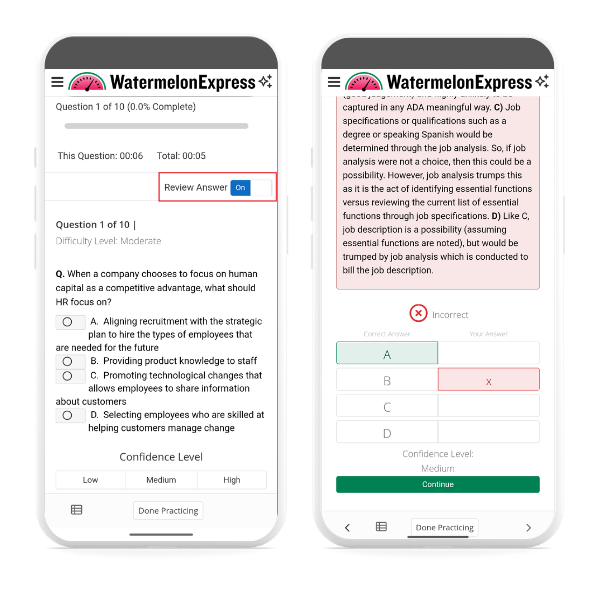
1. Above the content of each question, you'll see a "Review Answer" toggle. Toggle it to your desired setting. 


2. When "Review Answer" is on, you'll see the correct answer and explanation of the answer after you answer each question, and there's no review page between questions when it's turned off. 


Feedback
0 out of 0 found this helpful

scroll to top icon